

Ready to get started on a co-op advertising project? Our Agency Marketing Platform (AMP) makes co-op projects a breeze.
Let’s get started by following the steps outlined below.
Want to use your co-op dollars, but not sure how much you have available? Follow these steps to check your balance:
- Log in to the AMP through your iBIS Agency Services Once in iBIS, select Marketing > Resources > Agency Marketing Platform (AMP).
- Navigate to the Co-op page from the blue navigation bar at the top of your screen to arrive at the Co-op Dashboard page.
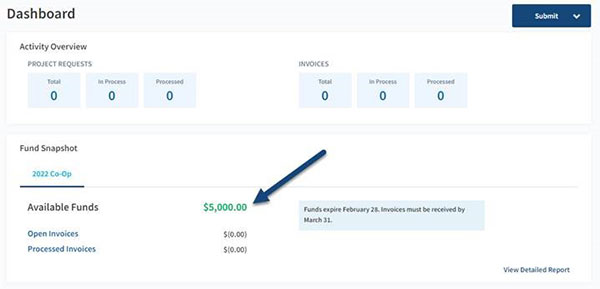
- The Fund Snapshot will be the second tile down on the Co-op Dashboard page, and this will show your agency’s remaining co-op fund balance for the year in green.
How to submit a co-op project for approval.
- Upon logging into the AMP, navigate to the Co-op page from the blue navigation bar at the top of your screen.
- Select Project Requests from the menu on the left side of your screen.
- Click the blue + Submit Project Requests button.
- Once in the form, continue to follow the prompts to submit your project information and timeline. Please provide any relevant details regarding what you will need from us to begin the project within the Comments section on page two of the form.
Do you need Frankenmuth Insurance to create artwork for your project?
Artwork designed by Frankenmuth Insurance requires specifications and logo files to be uploaded through our Co-op Creative Request Form within the AMP site. This can be accessed through the Quick Links section found on the left side of the Co-op page.
Once your project is complete, you can also submit your paid invoice or receipt directly through the AMP site to request reimbursement.
The AMP site is very user-friendly, but please don’t hesitate to reach out to us if you have questions about the program or trouble accessing the site. You can contact our team at marketing@fmins.com.
