
In our continuing efforts to ensure ease of doing business for your agency, this week we are pleased to introduce entry and screen modifications in our Commercial Lines Policy System.
Pre-Selected Enhancement Coverages
Several key enhancement coverages – including Cyber, EPLI, Equipment Breakdown, and our Plus & Premier coverages – will be pre-selected for new business submissions in Policy Center. This enhancement will save keystrokes while ensuring these essential coverages are included on Businessowner, Commercial Property and/or Liability, and Commercial Auto submissions.
Combined with functionality that allows you to create up to five versions of a quote, the pre-selected enhancement coverages will streamline the process to create multiple coverage options.
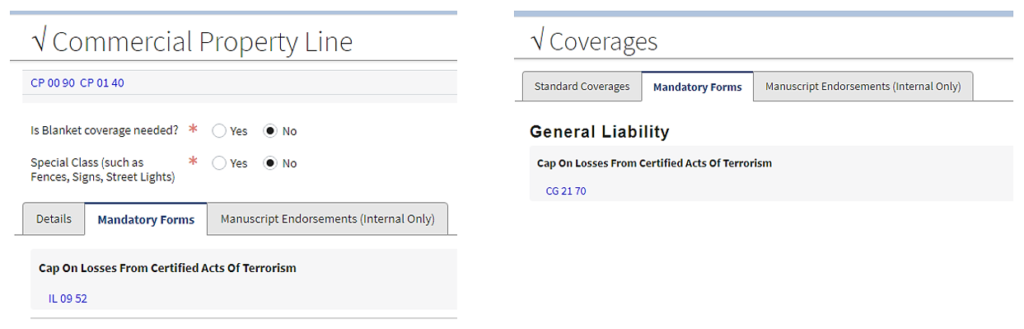
Mandatory Coverages Tabs – Commercial Property and Liability
To make it easier to identify selected coverages on Commercial Property and General Liability policies, we have moved mandatory coverages to their own tab. Mandatory coverages, such as terrorism and limited fungi, are state and ISO forms that are required on certain policies. Screen examples below show how the new tab will appear.
Agent of Record Notification
We’ve improved our messaging to notify agents early in the process of a possible conflict regarding the agent of record for an account. This alert informs an agent that another agency has previously submitted the same account. Underwriter review and an agent of record letter will be required before producing a quoted premium.
Builders’ Risk Reporting
We have modified the builders’ risk reporting feature within the policy system. Modifications include:
- A new deposit premium for Builders’ Risk Reporting policies.
- A new Builders’ Risk Report screen. This screen will be available after the reporting policy is issued. The screen includes the following information:
– The reporting period selected (monthly, quarterly, or annual reporting)
– An annual reporting table reflecting each month’s reported exposure and premium
– Total premium collected, total premium remaining and additional premium due after each report is entered - A printable PDF version of the table may be pulled directly from this screen by selecting the View Report button.
Thank you for your partnership. If you have questions about these enhancements, please contact your field manager or underwriter, or the Automation Support team at extension 3000.
